
Showing posts with label Trojan Removal. Show all posts
Showing posts with label Trojan Removal. Show all posts
Thursday, April 5, 2012
Haktech: U.K. Hacker Accessed Accounts for 20 Months Before Bust

Saturday, September 25, 2010
Virus threats and removal
New Virus Threat. this can be removed using this removal method.
http://haktech.blogspot.com/2009/12/standard-procedure-on-removing-virus.html
Generic.dx!tzf!996D784EC565
Spy-Agent.y!22149A1EE21E
Generic.dx!tzf!9DD5B21DABD9
Generic.dx!tzf!96FEC27B073A
Downloader-CIB!D64635035A06
BackDoor-AWQ.svr.gen.a!A5329B99B067
For more help you can always contact haktech labs.
Generic.dx!tzf, Spy-Agent.y,Generic.dx!tzf, Downloader-CIB, BackDoor-AWQ.svr.gen.a
Thursday, April 22, 2010
Can todays threat be prevented?
today the biggest threat faced by computer users is crimeware. now what is a crimeware? A crimeware is a malicious software that is written by cybercriminals like me before, i used to write crimewares. but not to steal money. just to steal passwords from my girlfriend, i mean girlfriends coz there are many of them.
this allows me to see their Social sites accounts like friendster,myspace and facebook. just to see whether they are loyal or not. coz this is important to me. and thank god i have caught a bunch of them cheating.. anyway lets get back to crimeware, a crimeware is written by cyber criminals with the sole purpose of making money illegally.
Crimeware may take the forms of scripts, viruses, worms, Trojans or other malicious computer programs. this threats cannot be prevented! and thats the answer!. but yesterdays threats can be. and why? because virus scanner and other virus protection software are based on definition files.
do you wonder why virus scanners are always updating thier software thru online updates? this updates the definition files of your virus protection software to the latest and detected list of virus/threats.
now a virus definition file is a list of known virus, known meaning virus that the maker of the virus scanner software knows about. its like a list of criminals in the police station, criminal records of know person that is a criminal. so that when the police see's them they can be identified. now if there is a new criminal that is
not on the list. then there is no way crime can be prevented!. thats why to make this clear. todays threat cannot be prevented at all. with exception to elite computer users ofcourse. becase and elite computer user can and will identify computer threats on the spot. :) and for some reason 80% of the infection/cybercrime happens because of human stupidity..
this allows me to see their Social sites accounts like friendster,myspace and facebook. just to see whether they are loyal or not. coz this is important to me. and thank god i have caught a bunch of them cheating.. anyway lets get back to crimeware, a crimeware is written by cyber criminals with the sole purpose of making money illegally.
Crimeware may take the forms of scripts, viruses, worms, Trojans or other malicious computer programs. this threats cannot be prevented! and thats the answer!. but yesterdays threats can be. and why? because virus scanner and other virus protection software are based on definition files.
do you wonder why virus scanners are always updating thier software thru online updates? this updates the definition files of your virus protection software to the latest and detected list of virus/threats.
now a virus definition file is a list of known virus, known meaning virus that the maker of the virus scanner software knows about. its like a list of criminals in the police station, criminal records of know person that is a criminal. so that when the police see's them they can be identified. now if there is a new criminal that is
not on the list. then there is no way crime can be prevented!. thats why to make this clear. todays threat cannot be prevented at all. with exception to elite computer users ofcourse. becase and elite computer user can and will identify computer threats on the spot. :) and for some reason 80% of the infection/cybercrime happens because of human stupidity..
Tuesday, December 29, 2009
Standard procedure on removing virus *UPDATED*
How to detect virus on your computer?
This is another updated guide by haktech solutions. the best online guide for computer users on how to remove and detect virus on a windows based computer. anyone at all ages can do this removal process, and we call it as a "standard procedure on removing virus"
Now for beginner and new users. you may ask.
Advance users like me can detect if a computer is infected. there are many types of infection.
but it is very important that you know what windows services and programs are running on your system and if you have installed some other programs, you should know what it is and where it resides. so that you can identify programs that are windows default and installed by you.
How to see running programs and service in your computer?
By default, windows comes with a tool that lets you see programs and services installed and running in your computer. and it is called the "Windows Task Manager"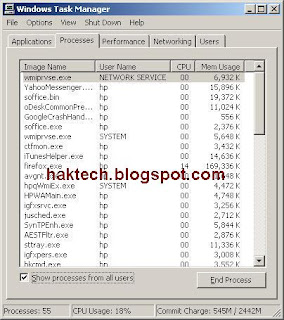
to access the Windows Task Manager is very simple. just press CTRL + ALT + DEL
this will bring you to the Windows Task MAnager.
from here you can find windows programs and services.
Default Microsoft programs and Service - this is a list of windows default programs and services.
if you found unknown programs listed on the programs or services then you may want to know more about it just to make sure it its harmfull or not.
Another way to identify is to use a more advance tool compared to the "windows Task Manager" this tool is so called HijackThis.

This tool have some advance feature that the windows task manager, you can go to the services window and disable all windows
services and also you can disable all windows startup program in just one click. that is if you are that paranoid.
by using either windows task manager or hihackthis you have the advantage to detect virus or any suspicious program/services
running in your computer.
Now. if you found any suspicious programs or services. it is time to do the standard removal part. you can either skip the 1st part and run this standard virus removal procedure automatically.
Standard procedure on removing virus:
1. We need to download combofix - combofix a an automated process that detects virus,spyware, malware automaticaly andremove them on your system. using advance detection to detect such harmful programs on your computer.
http://download.bleepingcomputer.com/sUBs/ComboFix.exe
2. Once done downloading combofix. before running it. you should
Now Run ComboFix
After running combofix, your computer will restart. and combofix will deliver reports on deleted files, you will see full
report given by the Combofix. now before connecting to your network. make sure you have enabled your virus scanner, then
connect to your network. for safety measures. also update your virus scaner to any new definition files. to stay protected.
This is another updated guide by haktech solutions. the best online guide for computer users on how to remove and detect virus on a windows based computer. anyone at all ages can do this removal process, and we call it as a "standard procedure on removing virus"
Now for beginner and new users. you may ask.
- what is a virus?
- what is a trojan?
- what is a computer worm?
Advance users like me can detect if a computer is infected. there are many types of infection.
but it is very important that you know what windows services and programs are running on your system and if you have installed some other programs, you should know what it is and where it resides. so that you can identify programs that are windows default and installed by you.
How to see running programs and service in your computer?
By default, windows comes with a tool that lets you see programs and services installed and running in your computer. and it is called the "Windows Task Manager"

to access the Windows Task Manager is very simple. just press CTRL + ALT + DEL
this will bring you to the Windows Task MAnager.
from here you can find windows programs and services.
Default Microsoft programs and Service - this is a list of windows default programs and services.
if you found unknown programs listed on the programs or services then you may want to know more about it just to make sure it its harmfull or not.
Another way to identify is to use a more advance tool compared to the "windows Task Manager" this tool is so called HijackThis.

services and also you can disable all windows startup program in just one click. that is if you are that paranoid.
by using either windows task manager or hihackthis you have the advantage to detect virus or any suspicious program/services
running in your computer.
Now. if you found any suspicious programs or services. it is time to do the standard removal part. you can either skip the 1st part and run this standard virus removal procedure automatically.
Standard procedure on removing virus:
1. We need to download combofix - combofix a an automated process that detects virus,spyware, malware automaticaly and
http://download.bleepingcomputer.com/sUBs/ComboFix.exe
2. Once done downloading combofix. before running it. you should
Check if your current virus scanner is running, if it does. please disable it as it may conflict the fix. Unplug or disconnect from your network. this will ensure that your computer is not connected to any type of

Lastly, you will need to close all running program. like internet explorer, firefox, yahoomesseger, skype, etc.

Now Run ComboFix
After running combofix, your computer will restart. and combofix will deliver reports on deleted files, you will see full
report given by the Combofix. now before connecting to your network. make sure you have enabled your virus scanner, then
connect to your network. for safety measures. also update your virus scaner to any new definition files. to stay protected.
Tuesday, October 21, 2008
Removing System.exe Trojan
Download And Install
1.) Spybot search and destroy
2.)Avast! Antivirus
3.) Comodo registry Cleaner. -> Delete the 3PMmUpdate entry from the startup..
Fix your HOST file.,Download this http://www.funkytoad.com/download/hoster.zip
Another way to remove the Trojan is ->>
Make Sure Internet Explorer is NOT open when trying this)
Launch HijackThis, click the 'Open'Misc Tools'Section -> 'Open hosts file manager'. Delete every line (select each line and click 'Delete line(s)') except the very first top lines beginning with # and: 127.0.0.1 localhost
Once finished, click the 'Open in Notepad' button. It should look like this:
QUOTE
# Copyright © 1993-1999 Microsoft Corp.
#
# This is a sample HOSTS file used by Microsoft TCP/IP for Windows.
#
# This file contains the mappings of IP addresses to host names. Each
# entry should be kept on an individual line. The IP address should
# be placed in the first column followed by the corresponding host name.
# The IP address and the host name should be separated by at least one
# space.
#
# Additionally, comments (such as these) may be inserted on individual
# lines or following the machine name denoted by a '#' symbol.
#
# For example:
#
# 102.54.94.97 rhino.acme.com # source server
# 38.25.63.10 x.acme.com # x client host
127.0.0.1 localhost
After the above:
Run hijackthis. Hit None of the above, Click Do a System Scan Only. Put a checkmark/tick in the box on the left side on these:
O4 - HKLM\..\Run: [Alcmtr] ALCMTR.EXE
O4 - HKLM\..\Run: [HBService32] System.exe
O4 - HKLM\..\Run: [3PMmUpdate] rundll32 "C:\WINDOWS\Update.dll",Main
O4 - HKLM\..\Run: [WinSysW] C:\WINDOWS\940477L.exe
O4 - HKLM\..\Run: [UserFaultCheck] %systemroot%\system32\dumprep 0 -u
Close ALL windows and browsers except HijackThis and click "Fix checked"
Delete these Files if listed:
C:\WINDOWS\940477L.exe
Reboot
------------------------------------------End of File-----------------------------------------
Worms / Viruses
Date
Title
10/09/2008
Win32/Lolyda Family
Aliases: Infostealer.Lineage (Symantec), PWS:Win32/Lolyda (MS OneCare), Trojan-GameThief.Win32.OnLineGames (Kaspersky)
10/09/2008
Win32/Lolyda.BZ
Aliases: PWS:Win32/Lolyda.K (MS OneCare), Infostealer.Onlinegame (Symantec), Trojan-GameThief.Win32.OnLineGames.thlh (Kaspersky)
10/09/2008
Packed.Generic.190
Aliases: none known
10/09/2008
Packed.Generic.189
Aliases: none known
10/08/2008
Trojan.Hexzone
Aliases: none known
10/07/2008
not-a-virus:NetTool.Win32.Transmit.a
Aliases: SPR/Transmit.A
10/07/2008
Trojan-Downloader.JS.Agent.bxr
Aliases: none known
10/07/2008
Worm.Win32.AutoRun.bnb
Aliases: none known
Good article on a recent "Spear phishing" attack on LinkedIn users
10/07/2008
Trojan.Win32.ConnectionServices.e
Aliases: none known
10/06/2008
Win32/Starimp.AX
Aliases: FakeAlert-AB.dr (McAfee), Troj/Agent-HRF (Sophos), Trojan.Fakeavalert (Symantec)
update new patches friend...
boot your computer on dos scan your memory for viruses...
(Avast and mcafee can clean this)
1.) Spybot search and destroy
2.)Avast! Antivirus
3.) Comodo registry Cleaner. -> Delete the 3PMmUpdate entry from the startup..
Fix your HOST file.,Download this http://www.funkytoad.com/download/hoster.zip
Another way to remove the Trojan is ->>
Make Sure Internet Explorer is NOT open when trying this)
Launch HijackThis, click the 'Open'Misc Tools'Section -> 'Open hosts file manager'. Delete every line (select each line and click 'Delete line(s)') except the very first top lines beginning with # and: 127.0.0.1 localhost
Once finished, click the 'Open in Notepad' button. It should look like this:
QUOTE
# Copyright © 1993-1999 Microsoft Corp.
#
# This is a sample HOSTS file used by Microsoft TCP/IP for Windows.
#
# This file contains the mappings of IP addresses to host names. Each
# entry should be kept on an individual line. The IP address should
# be placed in the first column followed by the corresponding host name.
# The IP address and the host name should be separated by at least one
# space.
#
# Additionally, comments (such as these) may be inserted on individual
# lines or following the machine name denoted by a '#' symbol.
#
# For example:
#
# 102.54.94.97 rhino.acme.com # source server
# 38.25.63.10 x.acme.com # x client host
127.0.0.1 localhost
After the above:
Run hijackthis. Hit None of the above, Click Do a System Scan Only. Put a checkmark/tick in the box on the left side on these:
O4 - HKLM\..\Run: [Alcmtr] ALCMTR.EXE
O4 - HKLM\..\Run: [HBService32] System.exe
O4 - HKLM\..\Run: [3PMmUpdate] rundll32 "C:\WINDOWS\Update.dll",Main
O4 - HKLM\..\Run: [WinSysW] C:\WINDOWS\940477L.exe
O4 - HKLM\..\Run: [UserFaultCheck] %systemroot%\system32\dumprep 0 -u
Close ALL windows and browsers except HijackThis and click "Fix checked"
Delete these Files if listed:
C:\WINDOWS\940477L.exe
Reboot
------------------------------------------End of File-----------------------------------------
Worms / Viruses
Date
Title
10/09/2008
Win32/Lolyda Family
Aliases: Infostealer.Lineage (Symantec), PWS:Win32/Lolyda (MS OneCare), Trojan-GameThief.Win32.OnLineGames (Kaspersky)
10/09/2008
Win32/Lolyda.BZ
Aliases: PWS:Win32/Lolyda.K (MS OneCare), Infostealer.Onlinegame (Symantec), Trojan-GameThief.Win32.OnLineGames.thlh (Kaspersky)
10/09/2008
Packed.Generic.190
Aliases: none known
10/09/2008
Packed.Generic.189
Aliases: none known
10/08/2008
Trojan.Hexzone
Aliases: none known
10/07/2008
not-a-virus:NetTool.Win32.Transmit.a
Aliases: SPR/Transmit.A
10/07/2008
Trojan-Downloader.JS.Agent.bxr
Aliases: none known
10/07/2008
Worm.Win32.AutoRun.bnb
Aliases: none known
Good article on a recent "Spear phishing" attack on LinkedIn users
10/07/2008
Trojan.Win32.ConnectionServices.e
Aliases: none known
10/06/2008
Win32/Starimp.AX
Aliases: FakeAlert-AB.dr (McAfee), Troj/Agent-HRF (Sophos), Trojan.Fakeavalert (Symantec)
update new patches friend...
boot your computer on dos scan your memory for viruses...
(Avast and mcafee can clean this)
Subscribe to:
Posts (Atom)