Thursday, January 1, 2009

rel=nofollow is dead?

I was thinking is rel=nofollow dead?. the dea cam up to my mind thinking that it is no more working..anyway i have bumped up with this 11 reasons against nofollow and why we should not
use them.

11 Reasons against nofollow

  1. nofollow does not prevent comment spam
  2. nofollow is confusingly named
  3. nofollow harms the connections between web sites
  4. nofollow is not useful for humans, just for search engines using PageRank or a similar technique
  5. nofollow could be used to shut web sites out
  6. nofollow discriminates legitimate users as spammers
  7. nofollow heists commentators’ earned attention
  8. nofollow could be used to further discriminate weblogs<
  9. nofollow prevents the Web from being a web
  10. nofollow eliminates the dissemination of free speech
  11. nofollow was developed in privacy with only search engines companies taking part in the discussion
Article From http://www.nonofollow.net/11-reasons-against-nofollow

Thursday, December 25, 2008

Worm - WYAutoIT Sohanad Imaut Variant REMOVAL

Worm - WYAutoIT Sohanad Imaut Variant REMOVAL

Symptoms:

> There is an AutoIT script error which appears very oft (Screenshot attached)

Line 0 (File "C:\Windows\system32\SVCIICHOST.exe");
$mang[$i] = "\\" & $read
^ ERROR
Error: Array Variable has incorrect number of subscripts or subscript dimension range exceeded.

> the following entries are detected by HijackThis

F2: REG:system.ini: Shell=Explorer.exe SVIICHOST.exe

D4: HKCU\..\Run: [Yahoo Messengger] C:\windows\system32\SVIICHOST.exe
further to symantec / sophos detail i chekced up for new folder.exe and this is there

HKEY_CURRENT_USER\Software\Microsoft\Windows\CurrentVersion\Explorer\WorkgroupCrawler\Shares
Value: "shared" = "\New Folder.exe"

> There is a scheduled task entry which enables SVIICHOST.exe to run daily
c:\windows\tasks\AT1.* is found.

> Task Manager and Registry Editor are disabled.

> SVIICHOST.exe is found running as an active process.

> During an online scan, ClamAV is supposed to detect it but clamwin 0.94.1 or WinClamavShield latest version doesnt detect it.

> It creates exe files in the name of all the folders opened just like any other autorun type worms.thereby spreading very easily through removable drives (thats how my colleague got it in first place)

> While runing messenger there is strange messages broadcasted every now and then.

> host of file names reported is available here - http://www.threatexpert.com/threats/w32-yautoit.html shows how variable and masquerading this is . threat levelmight be low but just a while ago i logged on to our storage server and it is fully infected with the folder name.exe files....

> broadcasts messages ilke this to all of your messenger contacts..

"E may, vao day coi co con nho nay ngon lam http://nhattruongquang.0catch.com

"Vao day nghe bai nay di ban http://nhattruongquang.0catch.com"

"Vao day nghe bai nay di ban http://nhattruongquang.0catch.com"

"Biet tin gi chua, vao day coi di http://nhattruongquang.0catch.com"

"Trang Web nay coi cung hay, vao coi thu di http://nhattruongquang.0catch.com"

"Toi di lang thang lan trong bong toi buot gia, ve dau khi da mat em roi? Ve dau khi bao nhieu mo mong gio da vo tan... Ve dau toi biet di ve dau? http://nhattruongquang.0catch.com"

"Khoc cho nho thuong voi trong long, khoc cho noi sau nhe nhu khong. Bao nhieu yeu thuong nhung ngay qua da tan theo khoi may bay that xa... http://nhattruongquang.0catch.com"

more error messages may be there on the syste,..

To remove! Just follow the Standard Removal Procedure Guide

Sunday, December 7, 2008

Standard Procedure on removing virus,spyware,malware and trojans

Standard Procedure to Remove Virus,Trojan, Malware, Spywares from windows! - proven and tested on I.T department, internet cafe's, offices and homes

Follow this Guide.

1.) Download This files and removal Tools needed!
Download Combofix
Download ATF cleaner
Download COMODO FIREWALL With AntiVirus
(this are all the tools you needed) if theres and update i will update this guide..Please leave a comment or questions then you can post to our forum if you need help on something.

2.) After Downloading all files - Unplug your network or your wireless connection, make sure you are not connected to the network.. just to be safe.

Some infections will put malicious lines into your hosts files. We will reset your hosts file with HostGuard. but you can use this later.

2.) (You can skip this Part) and go to step 3.
* download HostGuard.zip to your desktop and unzip the contents. hostguard can be downloaded here at haktech
* Install HostGuard
* Run HostGuard and Click Fix Windows Host - this will fix Your Windows Host
* Close or Hide HostGuard
(You can skip this part)

If you or SpyBot-SD have added modifications to your hosts file, they will need to be re-added
Or you can use the HostGuard to Guard your Windows Host this is much better..

3.) Run ATF-Cleaner Clean All Click main and Checll All and click Empty Selected, then if you have Mozilla Firefox Click FireFox and Select All then Click Empty Selected and also for opera if you have it in your system. (NOTE: Just to make sure. but you can skip this part if you want)

4.) # Close any open browsers before we can start removal process.
# Close/disable all anti virus and anti malware programs so they do not interfere with the running of ComboFix

* Now Make Sure all windows are close and no browser is open.and also make sure you are unpluged from the network and
if you are using wireless make sure you have turn it off.

combofix will search and remove all known threats, so keep your combofix updated!

Restart your computer after completing these steps.
this will remove Explorer.exe

(remember to send a thanks ;) )
Guide Copyright by Mark Sheldon Wong
Http://haktech.blogspot.com
Area51.Network - Nsfive.Net
Webcargo.Networks

Saturday, November 1, 2008

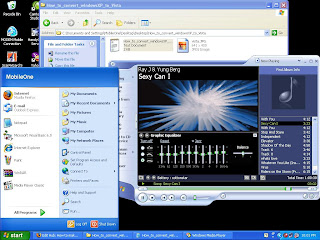
How to make WindowsXP to Vista without paying for upgrade?

How to make WindowsXP to Vista without paying for upgrade?

From Windows XP 


Upgrade to Vista

Are you tired of your old windows XP apearance/interface?

if you are then follow this hubpage and http://hacktech.blogspot.com tutorial
i made to convert your Windows XP to Vista..
Vista Transformation will give to your Windows XP system
the new and cool look of Microsoft's Windows Vista.
The pack changes most of the system icons, skins and toolbars
and also adds new enhancements to your desktop such as a dock bar or
a different system tray clock.
It is free and does a great job of giving machine a new Vista look.

System Requirements:

DOTNET FRAMEWORK
• 500mb or more disk space
Windows Vista SP2 or SP1 only.

Convertion Changes:
• Boot screen
• Welcome Screen / Logon Screen
• New msstyles files (visual styles)
• New desktop and file icons
• New toolbar icons
• Progress Dialogs
• Sounds scheme
• System Tray icons
• New Wallpapers
• Windows Media Player Skins


now follow these simple steps.

1.) download the Installer from this website.

Download here!


2.) after downloading. Run the installer and install.

3.) Now asuming you have installed the transformation pack.restart your computer
and wellcome to your new Vista look.

see how easy it is to make windowsxp to Vista..have fun..

Thursday, October 23, 2008

HostGuard - Windows Host Protection Utility

HostGuard - Windows Host Protection Utility
HostGuard will protect and guard you against spyware,malware and harmfull website before it gets you.
host guard has an option that will auto fix your host data while you suspect Virus,Spyware,Trojan,malware on your system, you can use HostGuard Auto Fix option while you are on the process of cleaning your system against this virus,trojan, malwares and spywares, hostGuard is a freeware. made by Mark Sheldon Wong.

Update and Definition files will be also available here for
Download as soon as it is available.


Download HostGuard
Download Link1, Download Link2

Note: if you can run or install ost Guard you may need to
download this Complete Installer Package
.
Complete Installer Download Click here


How to remove Win32:Murlo-CH [Trj] Removal Instruction

Win32:Murlo-CH [Trj] Removal Instruction

1.) Download This files and removal Tools for Win32:Murlo-CH [Trj]
Download Combofix http://download.bleepingcomputer.com/sUBs/ComboFix.exe
Download HostGuard
, HostGuard Download Link2 , Host Guard Complete Installer


* Download This Complete Offline
Win32:Murlo-CH [Trj] Removal Guide and tools with CFScript and HostGuard and ATF-Cleaner

*Alternate Download Link

2.) After Downloading - first we will reset Windows host file in order to Remove Win32:Murlo-CH [Trj]
but before doing so.. Unplug your network or your wireless connection, make sure you are not
connected to the network..

Some infections will put malicious lines into your hosts files. We will reset your hosts file with HostGuard.

* Please download HostGuard.zip to your desktop and unzip the contents.
* Install HostGuard
* Run HostGuard and Click Fix Windows Host - this will fix Your Windows Host
* Close or Hide HostGuard

If you or SpyBot-SD have added modifications to your hosts file, they will need to be re-added
Or you can use the HostGuard to Guard your Windows Host this is much better..


3.) Run ATF-Cleaner Clean All Click main and Checll All and click Empty Selected, then if you have
Mozilla Firefox Click FireFox and Select All then Click Empty Selected and also for opera if you have
it in your system.


4.) Running CFScript.txt with ComboFix to remove Win32:Murlo-CH [Trj]
# Close any open browsers before we can start Win32:Murlo-CH [Trj] removal process.
# Close/disable all anti virus and anti malware programs so they do not interfere with the running of ComboFix
if you have downloaded the CFScript then you must have them now in your desktop with COMBOFIX.EXE

CFScript.txt
- you can manualy create CFScript.txt, open notepad and copy the text below.


KILLALL::
File::
C:\WINDOWS\trz742.tmp
C:\WINDOWS\system32\trz740.tmp
C:\WINDOWS\system32\trz73F.tmp
C:\WINDOWS\system32\trz73E.tmp
C:\WINDOWS\system32\trz73D.tmp
C:\WINDOWS\system32\trz73C.tmp
C:\WINDOWS\system32\HBQQFFO.dll.$DIS
C:\WINDOWS\system32\explore.exe
C:\WINDOWS\system32\HBCT.dll
C:\WINDOWS\system32\HB1000Y.dll
C:\WINDOWS\system32\HBSOUL.dll
C:\WINDOWS\system32\HBFY.dll
C:\WINDOWS\system32\HBQQFFO.dll
C:\WINDOWS\system32\kildh3l.dll
C:\WINDOWS\system32\wllame.dll
C:\WINDOWS\system32\catower.dll
C:\WINDOWS\system32\comboaus.dll
C:\WINDOWS\system32\pewire.dll
C:\WINDOWS\system32\aotoppt.dll
C:\WINDOWS\system32\johandy.dll
C:\WINDOWS\system32\jolndyo.dll
C:\WINDOWS\system32\micsus.dll
C:\WINDOWS\system32\cupops.dll
C:\WINDOWS\system32\System.exe
C:\WINDOWS\system32\HBQQSG.dll
C:\WINDOWS\system32\lensch.dll
C:\WINDOWS\system32\yulhodpf.dll
C:\WINDOWS\system32\eskislk.exe
C:\WINDOWS\system32\eskisl.dll
C:\WINDOWS\Update.dll

Registry::
O21 - SSODL: sysocmgr - {DA1DE019-A6A8-ED40-4B87-248B2A93DE99} - C:\WINDOWS\sysocmgr.dll
O21 - SSODL: yulhodpf.dll - {434FA69C-5F0A-42e1-82B8-10AF2C8E53C6} - C:\WINDOWS\system32\apoebqrg.dll
O21 - SSODL: ehhzzeza.dll - {EB9660D8-E1CD-4ff0-B4A9-00CD907F928A} - C:\WINDOWS\system32\ehhzzeza.dll
O21 - SSODL: ljpzxdum.dll - {71A78CD4-E470-4a18-8457-E0E0283DD507} - C:\WINDOWS\system32\ljpzxdum.dll
O21 - SSODL: ssawfayn.dll - {D3112B69-A745-4805-874E-ABD480EA1299} - C:\WINDOWS\system32\ssawfayn.dll
O21 - SSODL: apoebqrg.dll - {434FA69C-5F0A-42e1-82B8-10AF2C8E53C6} - C:\WINDOWS\system32\apoebqrg.dll
O21 - SSODL: lmpsxxfz.dll - {2CB77746-8ECC-40ca-8217-10CA8BE5EFC8} - C:\WINDOWS\system32\lmpsxxfz.dll
O21 - SSODL: ifyshalr.dll - {F0930A2F-D971-4828-8209-B7DFD266ED44} - C:\WINDOWS\system32\ifyshalr.dll
O21 - SSODL: avicapwm.dll - {6B9FEAD7-4319-4312-AB05-D8C9CD255BFE} - C:\WINDOWS\system32\avicapwm.dll

[HKEY_LOCAL_MACHINE\Software\Microsoft\Windows\CurrentVersion\Run]
"3PMmUpdate"=-
"HBService32"=-
"HBService"=-

[HKEY_LOCAL_MACHINE\SOFTWARE\Microsoft\Windows\CurrentVersion\Explorer\ShellExecuteHooks]
"{434FA69C-5F0A-42e1-82B8-10AF2C8E53C6}"=-
"{EB9660D8-E1CD-4ff0-B4A9-00CD907F928A}"=-
"{71A78CD4-E470-4a18-8457-E0E0283DD507}"=-
"{D3112B69-A745-4805-874E-ABD480EA1299}"=-
"{2CB77746-8ECC-40ca-8217-10CA8BE5EFC8}"=-
"{F0930A2F-D971-4828-8209-B7DFD266ED44}"=-
"{6B9FEAD7-4319-4312-AB05-D8C9CD255BFE}"=-


*After copying paste and save the file CFScript.txt

* Now Make Sure all windows are close and no browser is open.and also make sure you are unpluged from the network and
if you are using wireless make sure you have turn it off.
* Now we will start to remove Win32:Murlo-CH [Trj] removal process

* Now drag and drop CFScript.txt to COMBOFIX


Restart your computer after completing these steps.
this will remove Win32:Murlo-CH [Trj]


Guide Copyright by Mark Sheldon Wong
Http://haktech.blogspot.com
Area51.Network
Webcargo.Networks

Tuesday, October 21, 2008

Removing System.exe Trojan

Download And Install
1.) Spybot search and destroy
2.)Avast! Antivirus
3.) Comodo registry Cleaner. -> Delete the 3PMmUpdate entry from the startup..

Fix your HOST file.,Download this http://www.funkytoad.com/download/hoster.zip

Another way to remove the Trojan is ->>
Make Sure Internet Explorer is NOT open when trying this)

Launch HijackThis, click the 'Open'Misc Tools'Section -> 'Open hosts file manager'. Delete every line (select each line and click 'Delete line(s)') except the very first top lines beginning with # and: 127.0.0.1 localhost


Once finished, click the 'Open in Notepad' button. It should look like this:


QUOTE
# Copyright © 1993-1999 Microsoft Corp.
#
# This is a sample HOSTS file used by Microsoft TCP/IP for Windows.
#
# This file contains the mappings of IP addresses to host names. Each
# entry should be kept on an individual line. The IP address should
# be placed in the first column followed by the corresponding host name.
# The IP address and the host name should be separated by at least one
# space.
#
# Additionally, comments (such as these) may be inserted on individual
# lines or following the machine name denoted by a '#' symbol.
#
# For example:
#
# 102.54.94.97 rhino.acme.com # source server
# 38.25.63.10 x.acme.com # x client host

127.0.0.1 localhost

After the above:

Run hijackthis. Hit None of the above, Click Do a System Scan Only. Put a checkmark/tick in the box on the left side on these:

O4 - HKLM\..\Run: [Alcmtr] ALCMTR.EXE
O4 - HKLM\..\Run: [HBService32] System.exe
O4 - HKLM\..\Run: [3PMmUpdate] rundll32 "C:\WINDOWS\Update.dll",Main
O4 - HKLM\..\Run: [WinSysW] C:\WINDOWS\940477L.exe
O4 - HKLM\..\Run: [UserFaultCheck] %systemroot%\system32\dumprep 0 -u

Close ALL windows and browsers except HijackThis and click "Fix checked"


Delete these Files if listed:
C:\WINDOWS\940477L.exe

Reboot

------------------------------------------End of File-----------------------------------------

Worms / Viruses


Date
Title


10/09/2008
Win32/Lolyda Family
Aliases: Infostealer.Lineage (Symantec), PWS:Win32/Lolyda (MS OneCare), Trojan-GameThief.Win32.OnLineGames (Kaspersky)


10/09/2008
Win32/Lolyda.BZ
Aliases: PWS:Win32/Lolyda.K (MS OneCare), Infostealer.Onlinegame (Symantec), Trojan-GameThief.Win32.OnLineGames.thlh (Kaspersky)


10/09/2008
Packed.Generic.190
Aliases: none known


10/09/2008
Packed.Generic.189
Aliases: none known


10/08/2008
Trojan.Hexzone
Aliases: none known


10/07/2008
not-a-virus:NetTool.Win32.Transmit.a
Aliases: SPR/Transmit.A


10/07/2008
Trojan-Downloader.JS.Agent.bxr
Aliases: none known


10/07/2008
Worm.Win32.AutoRun.bnb
Aliases: none known

Good article on a recent "Spear phishing" attack on LinkedIn users

10/07/2008
Trojan.Win32.ConnectionServices.e
Aliases: none known


10/06/2008
Win32/Starimp.AX
Aliases: FakeAlert-AB.dr (McAfee), Troj/Agent-HRF (Sophos), Trojan.Fakeavalert (Symantec)

update new patches friend...

boot your computer on dos scan your memory for viruses...

(Avast and mcafee can clean this)

tags

Friend Connect